Features & Warning Flags
MeshLens automatically evaluates selected assets against standard game performance budgets.
Warning Badges#
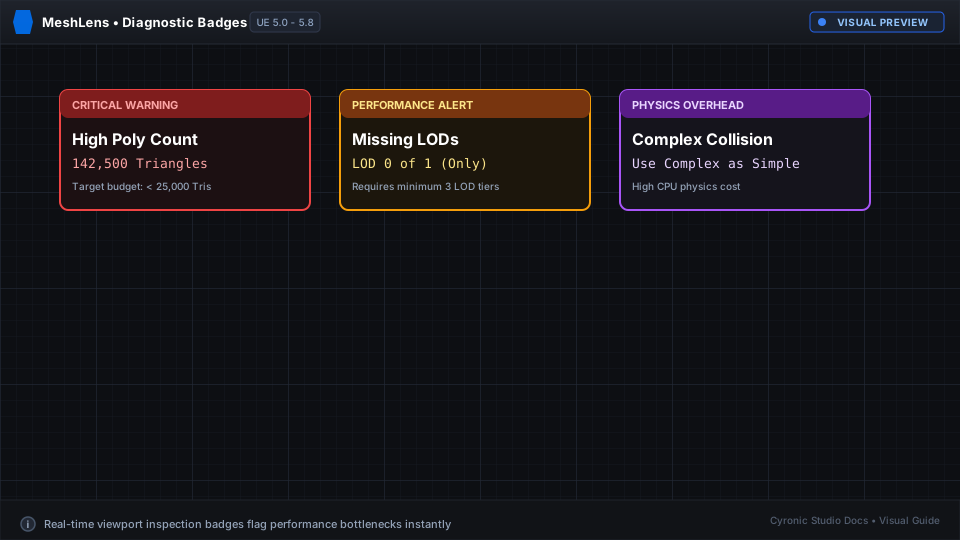
When a metric exceeds optimal thresholds, MeshLens renders clear warning badges at the top of the diagnostic card:
High Triangle Count#
- Trigger: Mesh exceeds
100,000triangles on LOD 0. - Advice: Consider using Nanite (in UE5) or generating lower-poly LODs.
Missing LODs#
- Trigger: Mesh has only 1 LOD (LOD 0) and Nanite is disabled.
- Advice: Open the asset and generate LOD levels in the Static Mesh Editor.
Excessive Material Draw Calls#
- Trigger: More than 4 material slots on a single prop.
- Advice: Merge textures or combine material slots into a shared atlas.
Complex Collision Warning#
- Trigger: Collision complexity is set to per-poly on high-density geometry.
- Advice: Generate simplified convex hulls or box collision primitives.
Click to expand
Editor Preferences & Customization#
You can adjust all warning thresholds to match your studio's specific target platforms (PC, Console, Mobile):
- In Unreal Editor, go to Edit > Editor Preferences.
- Scroll to the Plugins > MeshLens section.
- Configure target triangle thresholds, hotkeys, and color schemes.