Quick Start Guide
Follow these steps to put a working dynamic crosshair on your screen.
Step-by-Step Setup#
Add Widget to Your HUD
Open your HUD Widget Blueprint. Drag a Dynamic Crosshair Widget from the Palette into your Canvas Panel. Anchor it to the center of the screen (Anchors: 0.5, 0.5) and set Position to (0, 0) with Alignment (0.5, 0.5).
Save a Variable Reference
In the widget hierarchy, select the crosshair and check Is Variable. Name it
CrosshairRef.Wire Movement in Character Blueprint
Open your Character Blueprint. On Event Tick, get your Character Movement component, fetch its Velocity, and calculate its horizontal length (
Vector Length XY).Update Spread
Use Map Range Clamped to map speed (0 to 600) to spread (16 to 45). Pass the result to
CrosshairRef -> SetCrosshairLineSpread.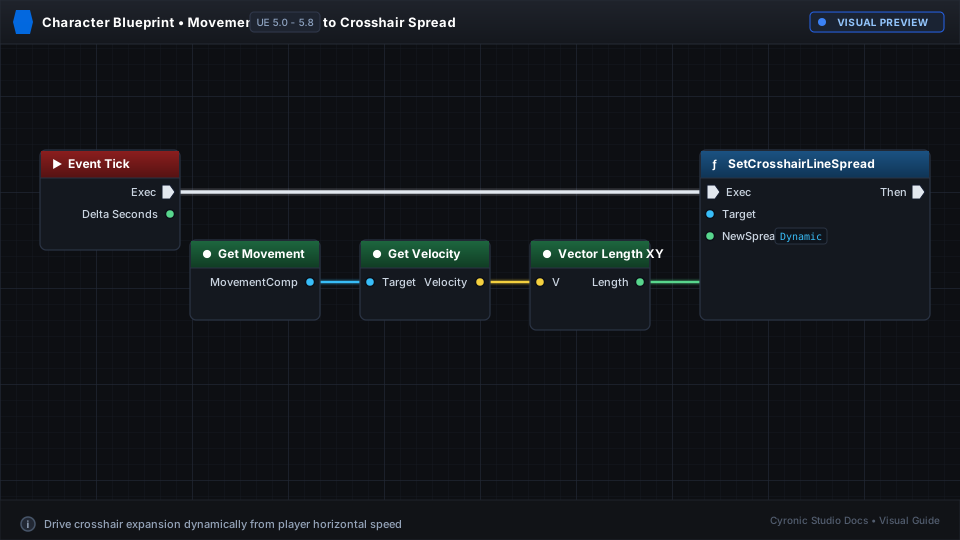
Click to expand