Features & Code Viewer Guide
The Blueprint To C++ Exporter includes a standalone, feature-packed Slate code viewer built right into Unreal Editor.
Dual-Pane Split Viewer#
- .H Button: Focuses the viewer entirely on the generated header file.
- .CPP Button: Focuses the viewer entirely on the implementation file.
- Split Button: Divides the window evenly into side-by-side panes so you can review declarations and implementations together.
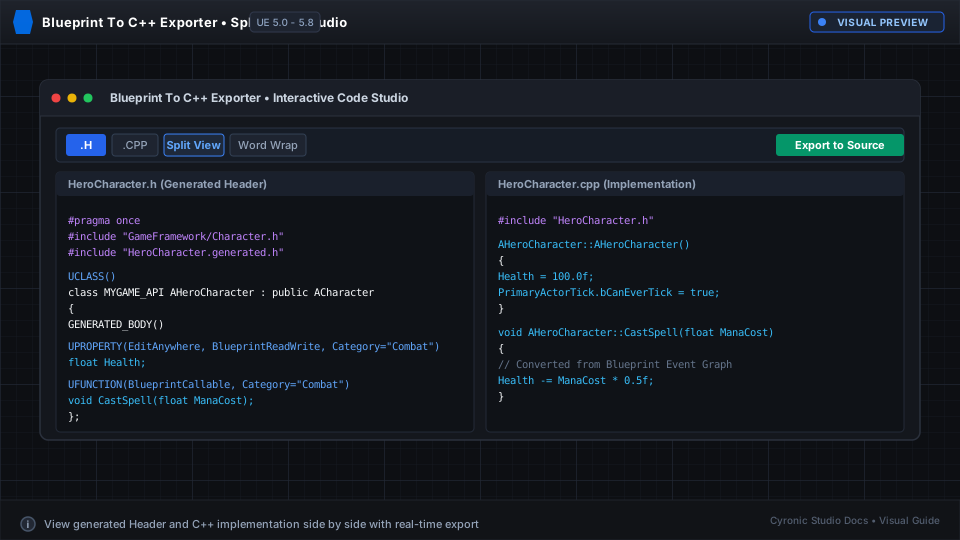
Click to expand
Search & Navigation Tools#
- Live Search: Type into the search field at the top of the viewer to highlight all matching tokens in real time.
- Next & Previous: Use the arrow buttons to cycle through search matches smoothly.
- Word Wrap Toggle: Click Word Wrap to switch between readable soft-wrapped text and horizontal scrolling.
Exporting Directly to Disk#
When you are ready to add the C++ class to your game:
- Click Export to Source... in the top toolbar.
- Select your project's Source folder.
- The plugin will write the .h and .cpp files with matching class names and includes.
- Trigger Live Coding (Ctrl + Alt + F11) to compile your new class immediately.